Đang tải nội dung…
All articles
Deleted 90% of the rows. Why is the MySQL file still the same size?
DELETE, purge and rebuilding solve different problems. Follow a 50,000-row experiment.
MySQL & InnoDB Internals · Part 1
Fictional setting, real lab evidence. Fortex in this series is a fictional setting; Tom and Ben are characters. Their conversations illustrate the reasoning. Measurements and assertions come from the linked Docker lab, not Fortex production incidents.
The Fortex journey · Chapter 1/8
The ticket Ben wanted to close early
New to Fortex, Ben volunteered to clean the event table in an older MySQL service. Delete expired data, check the row count, report the space saved. He had the SQL ready before Tom finished his coffee.
“The old rows are gone. The dashboard probably hasn't caught up.”
Tom pulled up a chair and looked at both the count and the storage graph. “Possibly. Which number are you expecting to fall?”
“The table size. We've deleted most of it.”
Instead of correcting him, Tom opened an isolated Docker environment and let Ben choose the first command. “Let's find out. If the file stays the same size, would inserting those rows again need a bigger file?”
Ben nodded, then hesitated. Both predictions had sounded reasonable until he put them together. This became their first experiment at Fortex.
Establish the storage scope first
“Before we run it, where does this table live?” Tom asked.
Ben pointed at the database name. “Its own file, or a shared tablespace?” Tom added. Ben checked the configuration. Storage settings were suddenly part of the explanation, rather than setup to skip.
This is InnoDB with file-per-table enabled: the table owns an .ibd file. Do not apply file-shrink conclusions unchanged to shared system or general tablespaces.
InnoDB manages pages inside a tablespace. A commonly configured default page size is 16 KiB. Purge removes historical versions and deleted records when they are no longer needed. A table with fewer visible rows may retain allocated pages, whose free space can serve later writes. Neither row count nor file length alone describes all of that state.
The PostgreSQL snapshot and VACUUM experiment explores a related need to retain history, but InnoDB purge and PostgreSQL VACUUM are not identical mechanisms.
What DELETE does and does not do
Ben drew a rectangle and crossed most of it out. “I was imagining the file losing this part.”
Tom drew separate boundaries around the visible rows and the allocated space. “Your drawing explains the query result. We still need to explain the file.”
After a delete commits, a normal new snapshot no longer sees those rows. Physical cleanup may happen later because older transactions can still need their versions. The InnoDB multi-versioning documentation describes this history.
Purge can make space reusable without shrinking the tablespace file. Keeping allocated space is useful if the table will refill. DELETE is not simply cutting a byte range off a file's end.

The diagram is conceptual, not a measured page map. Metadata size estimates are not necessarily direct file-length measurements, so this lab uses stat on the actual .ibd, counts rows, and checks a survivor-data fingerprint.
A small reproducible environment
Tom asked Ben to prepare the data and write down his predictions: rows remaining, file length after deletion, and file length after reinsertion. They used a disposable database. Learning this did not require risking Fortex's data.
The digest-pinned MySQL image has one CPU, a 768 MB memory limit, and a 128 MB buffer pool. Its disposable database lives on a 512 MB tmpfs with no published ports or application-data mounts.
Tmpfs makes the experiment lightweight, but the measurement is logical file length inside the container. It is neither an SSD benchmark nor a measurement of Docker Desktop's virtual disk file.
CREATE TABLE events (
  id INT PRIMARY KEY,
  payload VARCHAR(256) NOT NULL
) ENGINE=InnoDB;
Payloads deterministically repeat SHA2(id, 256) four times. There are no secondary indexes to mix additional structures into the experiment. Download the source below and run:
python3 labs/engine.py mysql-delete-space
A signed-in workspace user can also rerun it from the article. Each execution has isolated data and its own report; rerunning does not replace the published measurements.
Five observations
“We should measure the reinsertion too,” Ben said. “If the empty space is reusable, that's where we'll see it.”
Tom moved the keyboard across. Ben had added a useful question of his own. They followed the five steps below; the measurements belong to the accompanying lab.
Seed 50,000 rows, then delete IDs 1 through 45,000:
DELETE FROM events WHERE id <= 45000;
SELECT COUNT(*) FROM events;
The driver records purge_del_mark_records before deletion and waits for an increase of at least 45,000. This avoids confusing an unchanged file with a sample taken before purge processed the deletion. See InnoDB purge configuration.
The driver reinserts the deleted IDs, measures again, deletes them a second time, and finally runs OPTIMIZE TABLE.
| Stage | Visible rows | .ibd bytes | MiB |
|---|---|---|---|
| Seed | 50,000 | 54,525,952 | 52.00 |
| Delete 90%, wait for purge | 5,000 | 54,525,952 | 52.00 |
| Reinsert | 50,000 | 54,525,952 | 52.00 |
| Delete again | 5,000 | 54,525,952 | 52.00 |
| OPTIMIZE TABLE | 5,000 | 8,388,608 | 8.00 |
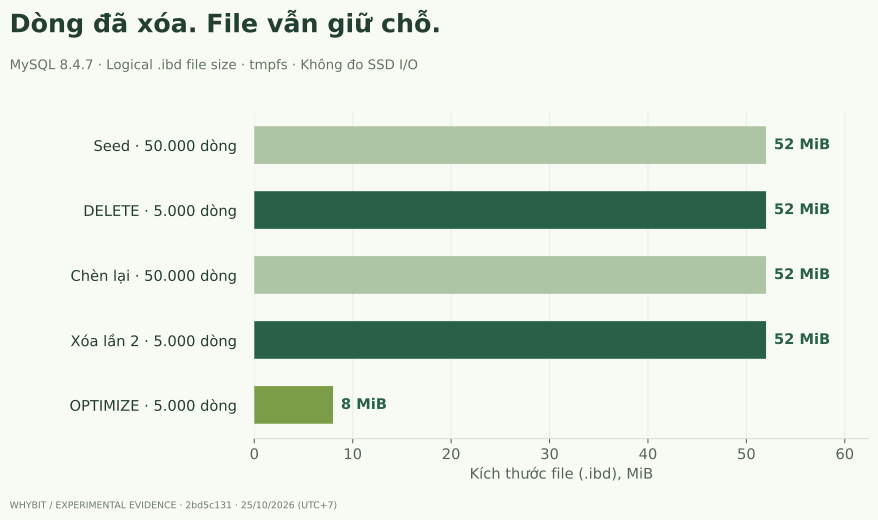
The published report and raw SQL logs provide the measurements and correctness assertions. One MiB is 1,048,576 bytes; the chart begins at zero.
The important middle step is reinsertion: the retained space held new rows without growing the file. Ten percent of the original rows also does not imply exactly ten percent of the original file length. Allocation, tree structure, metadata, and current layout all contribute.
Why not rebuild after every cleanup?
Once the rebuild shrank the file, Ben opened the job scheduler. “OPTIMIZE after every retention job?”
“You've found a way to shrink it,” Tom said. “Now tell me whether tomorrow's writes will fill it again.”
Ben paused over the schedule field. The answer depended on Fortex's data lifecycle, not just the SQL.
If a retention table regularly deletes and refills to a similar size, reclaiming then reallocating its space adds work. If the table has permanently become smaller and disk recovery has concrete value, rebuilding may be worthwhile.
For this file-per-table case, OPTIMIZE can rebuild the table and reclaim space. Execution details and metadata-lock windows depend on the version, indexes, and concurrent DDL. Consult OPTIMIZE TABLE; online does not mean that locks never occur.
| Option | Benefit | Cost or limit |
|---|---|---|
| Leave reusable space | Avoid a rebuild; serve future writes | File remains allocated |
| OPTIMIZE / rebuild | Reclaim space from a private tablespace file | Rewrite work, temporary headroom, metadata locking, possible replica impact |
| TRUNCATE | Discard the entire table's data | Not selective; foreign-key and DDL semantics matter |
| Partition retention | Remove expired data by partition | Requires suitable keys, constraints and schema design |
Only the first two options were tested here. TRUNCATE and partitioning need separate validation. Review file-per-table reclamation scope before choosing.
Limits and production decisions
“Can I report that we've saved this much on the actual system?”
“We can report the lab result,” Tom said. “Before proposing a rebuild, find out what's occupying the disk and whether the operation has room to run.” Ben renamed his note from the fix to conditions for the fix.
There is no concurrent load, replica, large backup, hundred-gigabyte table, or p99 target in this experiment. A short lab rebuild does not predict production duration.
First locate the actual growth: table files, undo, binlogs, temporary files, or Docker's virtual disk. Rebuilding one table cannot fix every source of disk usage. An operation requiring temporary storage may also be a poor emergency choice when the filesystem is almost full.
Large deletes create undo, redo, and replication work. Batching can bound each unit, but batch sizes and pacing need real workload measurements; this experiment does not provide a universal value.
Before acting, confirm commit and row counts, identify the actual tablespace, distinguish used and reusable space, investigate history retention if necessary, and ask whether the table will refill. If reclaiming space is justified, test headroom and lock behavior on a representative copy.
An unchanged file does not by itself mean deletion failed. Here, the reinsertion step gives the useful answer: space that appeared unreclaimed was already available for reuse. Continue with the index and selectivity investigation.
The page Ben takes into tomorrow
Ben left the OPTIMIZE schedule blank. In his notebook he wrote: “Rows disappearing, space becoming reusable, and a file shrinking are separate questions.” Underneath came a new question: if storage works in pages, how many pages does an index actually save us from reading?
Tom pointed to that last line. “Let's start there tomorrow.”
Next chapter: There is an index. Why is PostgreSQL still scanning the table? · Start the journey